
Script Breakdown
Turn your screenplay into a scene-by-scene list of everything your shoot needs, ready to check, print and build a schedule from.
Four Steps to Your First Script Breakdown
Script Breakdown is included on Screen Ignite, Ember and Radiant. All you need is your screenplay as a PDF.
Open Script Breakdowns
Upload your screenplay
Let loqyn read every scene
Check, print and share
Good to Know
Every department covered
Cast, extras, stunts, vehicles, animals, props, set dressing, costumes, makeup and hair, special effects and visual effects, each picked out scene by scene.
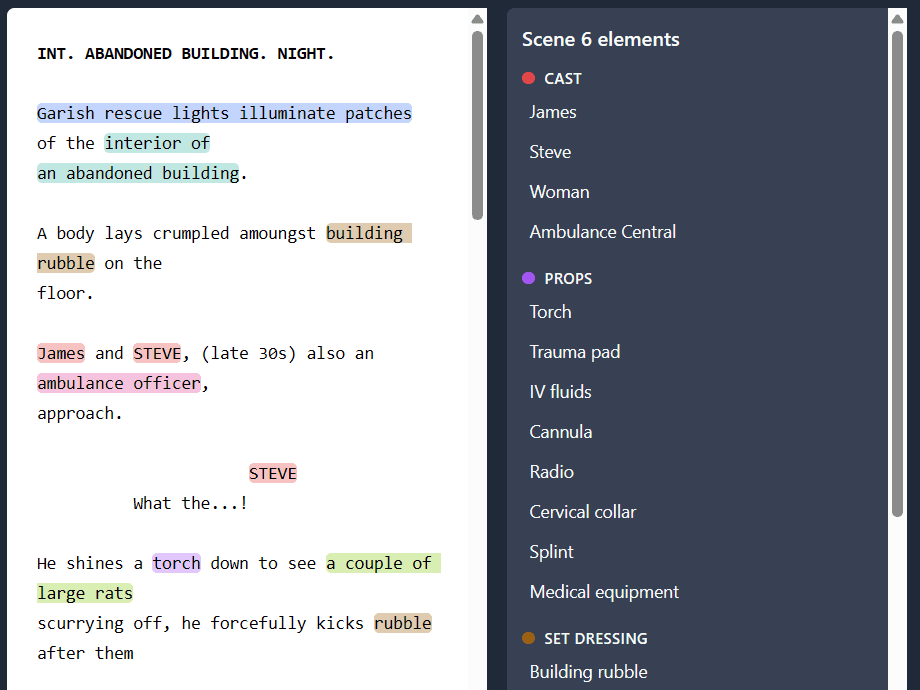
Colour-coded script
Each element is highlighted in the script in its category's colour, so you can see exactly where it came from.
Your original PDF, kept safe
loqyn keeps a private copy of your script with the breakdown. Download it again any time from the breakdown page.
The first step to a schedule
Your breakdown feeds your Schedule and your Script-based Budget, so you never type the same details twice.
Script Breakdown Questions
Common questions about breaking down your script with loqyn.